This guide provides IT professionals with a complete technical roadmap for deploying Samba Server 4 in enterprise environments.
- Samba 4 enables native Active Directory Domain Controller functionality on Linux without Windows Server licensing costs.
- Proper DNS and Kerberos configuration is critical for domain controller reliability and security.
- Integration with Linux and Windows clients requires careful attention to authentication protocols and time synchronization.
- Modern IT infrastructures benefit from Samba’s flexibility in hybrid cloud and on-premise deployments.
After reading, you will understand how to deploy, secure, and manage a Samba Server 4 domain controller in production.
Understanding the Foundations of Samba Server 4
Samba Server 4 represents a major evolution from earlier file-sharing versions. It implements Active Directory Domain Controller functionality natively on Linux.
What Makes Samba 4 Different from Samba 3
Samba 3 provided file and print services plus NT4-style domain control. Samba 4 includes a complete Active Directory compatible domain controller.
It integrates LDAP directory services, Kerberos authentication, DNS server, and Group Policy support. This eliminates the need for separate Windows Server licenses in many environments.
The internal DNS server supports dynamic updates and secure DDNS. This is essential for domain-joined clients to register their records automatically.
Core Components of a Samba AD DC
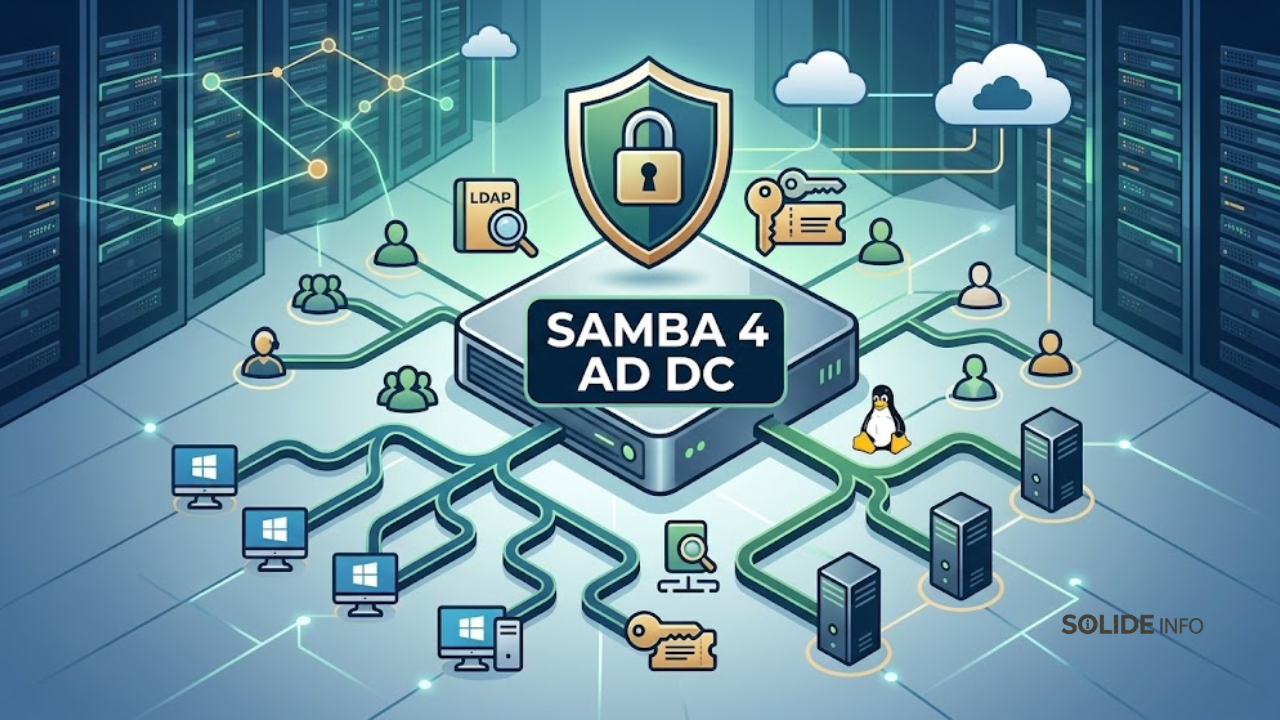
A Samba Active Directory Domain Controller consists of several integrated services.
The LDAP server stores directory objects such as users, groups, computers, and organizational units. Samba uses the OpenLDAP backend or its internal LDB database.
The Kerberos Key Distribution Center (KDC) issues tickets for authentication. Clients obtain TGTs and service tickets without transmitting passwords.
The DNS server resolves domain names and supports SRV records required for domain controller discovery. Clients locate the KDC and LDAP servers through these records.
The SMB file sharing service handles user home directories, sysvol replication, and netlogon shares. These are critical for Group Policy deployment and logon scripts.
Why Choose Samba Over Windows Server
Cost reduction is the primary driver. Samba eliminates Windows Server licensing and CALs for domain controller roles.
Operational flexibility allows deployment on any Linux distribution, including Debian, Ubuntu, Rocky Linux, and AlmaLinux.
You can run Samba on virtual machines, containers, or bare metal. This fits well with infrastructure as code and automation practices.
Security benefits include smaller attack surface, full source code transparency, and rapid patch deployment through standard Linux update channels.
Technical Requirements for Production Deployment
Minimum hardware includes 2 vCPUs, 4 GB RAM, and 40 GB disk space. Production environments with many users require more resources.
The domain controller needs a static IP address and proper reverse DNS. Time synchronization with NTP is mandatory for Kerberos.
DNS resolution must point to the Samba server itself during provisioning. External forwarders handle internet queries.
Firewall rules must allow TCP and UDP ports 53, 88, 135, 139, 389, 445, 464, 636, 3268, 3269. These cover DNS, Kerberos, LDAP, and SMB traffic.
How Samba Server 4 Fits Into Modern IT Infrastructure
Modern enterprises operate hybrid environments with on-premise data centers, cloud workloads, and remote endpoints. Samba integrates across these domains.
Integration with Linux and Unix Environments
Samba provides native LDAP and Kerberos services that Linux systems already understand. No extra gateways or translation layers are needed.
PAM modules authenticate Linux users against the Samba domain. SSH logins, sudo rules, and application authentication work seamlessly.
Automount services can use LDAP to provide network home directories. This simplifies user roaming across multiple Linux workstations.
System administrators can manage Linux servers through AD group membership. For example, granting sudo access based on domain security groups.
Supporting Windows Clients Without Windows Server
Windows 10, 11, and Windows Server can join a Samba domain exactly like a Microsoft AD domain. Group Policy processing works for most administrative templates.
File shares hosted on Samba support ACLs, quota enforcement, and audit logging. Windows clients see these shares as standard network drives.
Print services with driver upload and point‑and‑print work correctly. Samba can act as a print server for Windows clients without additional software.
Remote Desktop Services integration works through Kerberos authentication. Users can log into terminal servers using domain credentials.
Hybrid Cloud and Multi‑Site Architectures
Samba supports read‑only domain controllers (RODCs) for branch offices with unreliable uplinks. This reduces WAN traffic while maintaining local authentication.
You can deploy Samba on cloud virtual machines in AWS, Azure, or Google Cloud. Site‑to‑site VPNs connect cloud DCs to on‑premise networks.
LDAP replication between Samba servers uses standard Active Directory protocols. Multi‑master replication is available through the built‑in directory replication service.
Hybrid identity scenarios can synchronize Samba directories with Azure AD using open source tools like LAM or custom scripts.
Security Frameworks and Compliance
Samba supports TLS encryption for LDAP traffic. You can install certificates from a private CA or public providers.
Kerberos encryption types include AES‑128, AES‑256, and RC4 (disabled by default in modern configurations).
Group Policy can enforce security settings such as password policies, account lockout thresholds, and audit logging configurations.
Compliance with PCI‑DSS, HIPAA, or ISO 27001 requires detailed audit trails. Samba logs authentication events, file access, and directory changes to syslog.
Real‑World Applications and Technical Implementation
Organizations across sectors use Samba Server 4 for identity management and file sharing. The following sections show practical deployment patterns.
Deploying Samba as an Active Directory Domain Controller
Start with a minimal Linux installation. Set a static hostname matching your intended domain (e.g., dc01.contoso.local).
Disable NetworkManager and configure static IP in /etc/network/interfaces. Set DNS to 127.0.0.1 after provisioning.
Install required packages: samba, krb5‑config, krb5‑user, winbind, smbclient, dnsutils. Stop and disable default smbd, nmbd, winbind services.
Run the provisioning command:
bash
samba-tool domain provision --use-rfc2307 --interactive
Enter the realm, domain, administrator password, and DNS forwarder. The tool generates a fresh smb.conf and private database.
Copy the generated Kerberos configuration to /etc/krb5.conf. Unmask and start the samba‑ad‑dc service.
Test with samba-tool domain level show, kinit administrator, and klist. Verify DNS SRV records with host -t SRV _ldap._tcp.yourdomain.
root@dc1:/home/ad-01#
root@dc1:/home/ad-01#
root@dc1:/home/ad-01# samba-tool domain level show
Domain and forest function level for domain 'DC=domaine-example,DC=local'

Forest function level: (Windows) 2008 R2
Domain function level: (Windows) 2008 R2
Lowest function level of a DC: (Windows) 2008 R2
root@dc1:/home/ad-01# kinit administrator
Password for [email protected]:
Warning: Your password will expire in 40 days on Sun 31 May 2026 07:19:58 AM EDT
root@dc1:/home/ad-01# klist
Ticket cache: FILE:/tmp/krb5cc_0
Default principal: [email protected]

Valid starting       Expires              Service principal
04/20/2026 09:50:45  04/20/2026 19:50:45  krbtgt/[email protected]
        renew until 04/21/2026 09:50:41
root@dc1:/home/ad-01# host -t SRV _ldap._tcp.yourdomain
_ldap._tcp.yourdomain has no SRV record
root@dc1:/home/ad-01#
Configuring File Sharing with Domain Authentication
Create a shared directory and set Unix permissions. For example, /srv/samba/share owned by root with 2770 permissions.
Add a share definition to /etc/samba/smb.conf under the [global] section. Use valid users parameter to restrict access to domain groups.
bash
[companydata]
   path = /srv/samba/share
   read only = no
   browseable = yes
   valid users = @"DOMAIN\Domain Users"
   inherit permissions = yes
Restart the Samba service. Windows clients can map the drive using \\dc01\companydata.
Linux clients mount Samba shares via mount.cifs with Kerberos authentication. Use mount -t cifs //dc01/companydata /mnt -o sec=krb5.
Managing Users and Groups via Command Line
Create users with samba-tool user create username. Set password with samba-tool user setpassword username .
Add users to groups using samba-tool group addmembers "GroupName" username. List members with samba-tool group listmembers "GroupName".
Create organizational units with samba-tool ou create "OU=Servers,DC=contoso,DC=local". Move objects using samba-tool user move username "OU=newpath".
Enable Unix attributes with samba-tool user add username --uid-number=10001 --gid-number=10000. This allows Linux login.
Joining Linux Clients to the Domain
Install SSSD and realmd packages. Configure DNS to point to the Samba DC. Discover the domain with realm discover contoso.local.
Join the domain using realm join --user=Administrator contoso.local. This automatically configures SSSD, PAM, and NSS.
Enable home directory creation in /etc/pam.d/common-session with session optional pam_mkhomedir.so skel=/etc/skel umask=077.
Restart SSSD and test login with su - domainuser. Check group membership with id domainuser.
Operational Challenges and Best Practices
Running a Samba domain controller requires attention to specific operational details. Following best practices prevents common failures.
Time Synchronization Is Critical
Kerberos authentication fails if the time difference between client and DC exceeds five minutes. Install NTP on all domain controllers.
Configure the primary DC to synchronize with reliable external time sources. Use pool.ntp.org or organizational stratum servers.
All domain‑joined systems must sync time with the domain controller. Windows clients use the w32tm service.
Linux clients can use systemd‑timesyncd or chrony. Point them to the DC or a common NTP infrastructure.
DNS Configuration Pitfalls
The Samba DNS server must be authoritative for the domain zone. Do not delegate subdomains without proper configuration.
Forwarders are required for external resolution. Misconfigured forwarders cause internet lookup failures and slow logins.
Reverse lookup zones are optional but recommended for troubleshooting. Create them with samba-tool dns zonecreate.
Never point a domain controller to external DNS servers for its own resolution. Always use 127.0.0.1 as primary.
Backup and Disaster Recovery
The Samba database resides in /var/lib/samba/private/. Back up this directory regularly using standard tools like rsync or tar.
Schedule backups before any major change such as schema updates or domain level raises. Test restoration procedures on a isolated network.
Store backups off‑site or in a different location from the primary DC. Encrypt backups to protect sensitive directory data.
For rapid recovery, maintain a second domain controller. If the primary fails, the secondary continues serving authentication requests.
Security Hardening Recommendations
Disable SMB1 protocol entirely. It is insecure and no longer needed. Add server min protocol = SMB2 to smb.conf.
Enforce LDAP signing and channel binding to prevent man‑in‑the‑middle attacks. Set ldap server require strong auth = yes after installing valid certificates.
Use firewall rules to restrict administrative access. Only allow RPC, LDAP, and SMB from trusted subnets.
Regularly update the Linux distribution and Samba packages. Subscribe to security advisories for critical patches.
Future Trends and Emerging Technologies
Samba continues to evolve alongside Microsoft Active Directory. Understanding future directions helps with long‑term planning.
Samba and Cloud Identity Services
Modern enterprises adopt Entra ID (Azure AD) for cloud‑first identity management. Samba does not natively sync with Entra ID.
Third‑party tools like LDAP Account Manager or custom scripts can bridge the gap. You can export users and groups via LDIF and import into Entra ID.
Future Samba versions may include native OpenID Connect or OAuth2 support. This would allow integration with cloud applications without extra gateways.
For now, hybrid environments often run Samba on‑premise and use Entra ID Connect to synchronize with Windows Server AD. This indirect path works but adds complexity.
Automation and Infrastructure as Code
Ansible and Terraform can automate Samba deployment. Write playbooks to provision the OS, install packages, and run samba-tool domain provision.
Store configuration files in version control. Use templates to generate smb.conf, krb5.conf, and resolv.conf dynamically.
Containerized Samba AD DCs are possible but not yet common. Stateful containers with persistent volumes can work, but cluster management adds overhead.
Test automation in staging environments before production. Validate replication, failover, and backup recovery as part of the pipeline.
Open Source Alternatives and Complementary Tools
FreeIPA provides integrated identity management for Linux‑only environments. It uses 389 Directory Server, MIT Kerberos, and DNS.
FreeIPA supports Samba domain trusts but not full AD compatibility. Choose FreeIPA for pure Linux shops and Samba for mixed Windows/Linux.
Keycloak offers LDAP and Kerberos bridges to modern protocols like SAML and OpenID Connect. Deploy Keycloak in front of Samba for web application single sign‑on.
Apache Directory Studio and LDAP Account Manager simplify day‑to‑day administration. These tools provide graphical interfaces for user and group management.
The Role of Samba in Zero Trust Architectures
Zero Trust principles assume no implicit trust. Samba can integrate with network access control and MFA solutions.
Deploy RADIUS authentication backed by Samba LDAP. Network switches and VPN gateways can query Samba for user authentication.
Implement certificate‑based authentication for machine accounts. Auto‑enroll certificates using Samba as a CA or integrate with external PKI.
Monitor authentication logs with a SIEM. Samba logs to syslog, which tools like Wazuh or Splunk can ingest.
Advanced FAQ
Can Samba Server 4 replace a Windows Active Directory domain controller completely?
Yes, for most on‑premise environments. Samba supports domain controller functionality, Group Policy, DNS, and Kerberos. However, Exchange Server, SharePoint, and some Microsoft management tools require Windows AD.
How does Samba handle Group Policy Objects (GPOs)?
Samba stores GPOs in the sysvol share. Windows RSAT tools can create and edit GPOs against a Samba domain. Not all administrative templates work, but common security policies and registry settings function correctly.
What are the limitations of Samba AD compared to Microsoft AD?
Samba does not support fine‑grained password policies, dynamic access control, or AD Recycle Bin. It also lacks native Exchange integration and some advanced replication topologies.
Is Samba secure for regulated industries like finance or healthcare?
Yes, when properly configured. Samba supports LDAPS, Kerberos encryption, and audit logging. Many organizations pass compliance audits using Samba. The key is to follow hardening guides and maintain regular updates.
Can I run Samba in a containerized environment like Docker or Kubernetes?
Technically yes, but not recommended for production. The Samba AD DC requires stable storage, network identity, and time synchronization. Containers add complexity without clear benefits for this stateful service.
How do I troubleshoot Kerberos authentication failures?
Check time synchronization first. Use klist to view tickets. Examine /var/log/samba/log.krb5 for errors. Test with kinit manually. Ensure DNS resolves the domain controller correctly.
What is the recommended backup strategy for Samba AD DC?
Back up /var/lib/samba/private/ daily. Also back up the sysvol share (/var/lib/samba/sysvol). Use a secondary domain controller for real‑time redundancy. Test restores quarterly.
Does Samba support Windows Hello for Business or biometric authentication?
No. Windows Hello for Business requires cloud trust or hybrid certificate trust models that Samba does not implement. Use password or smart card authentication instead.
Deploying Samba Server 4 as an Active Directory Domain Controller provides a cost‑effective, flexible identity management solution for modern IT environments. It integrates seamlessly with both Linux and Windows clients, supports hybrid cloud architectures, and aligns with security best practices.
Understanding the core components—LDAP, Kerberos, DNS, and SMB—is essential for successful deployment. Operational challenges such as time synchronization, DNS configuration, and backup strategies require careful planning.
As organizations adopt zero trust, automation, and cloud identity services, Samba continues to evolve. It remains a viable choice for enterprises seeking open source, auditable, and self‑managed directory services.
The Samba Server 4 approach described in this article provides a production‑ready blueprint. Start with a proof of concept, follow the hardening guidelines, and scale confidently across your infrastructure.
Discover more from Solide Info | The Engineer’s Authority on Cyber Defense
Subscribe to get the latest posts sent to your email.