When Process Explorer reveals a cluster of child processes with no traceable parent PID, the Windows operating system has already given you a partial and incomplete truth.
The four technical takeaways from this article:
- Orphaned child processes can result from telemetry loss (PID recycling), PPID spoofing, process hollowing, or brokered execution through Windows subsystems — each demands a different IR response path.
- lsass exe (the Local Security Authority process) and explorer exe are the most abused spoofed parent identities because both are always running and always trusted by default.
- Sysmon Event ID 1 (GUID-based lineage) cross-correlated with Security Event 4688 (PID-based lineage) is the most reliable method to distinguish telemetry gaps from deliberate defense evasion.
- Microsoft Process Monitor and Process Explorer together provide real-time behavioral triage that no static SIEM alert can replicate when the compromise is still active.
The Technical Anatomy of Orphaned Windows Child Processes
When a system surfaces a burst cluster of child processes with no clean traceable parent PID, there are multiple technically verifiable explanations.
Some are benign artifacts of how Windows manages process namespaces. Others are deliberate attacker tradecraft. Distinguishing between them is the first and most critical triage decision.
Parent-Child Lineage and PID Recycling

Windows does not guarantee that parent-child lineage remains reconstructable after the parent process terminates.
The PID namespace is finite and actively recycled. If a short-lived launcher spawns one or more child processes and exits immediately, later telemetry may show those children with a parent PID that is no longer active, has been reassigned to a completely different process, or was never fully captured by the logging layer before recycling occurred.
This is especially common during burst execution windows — software installers, scripted service management engines, package deployment tools, or task schedulers that spawn large numbers of child processes in rapid sequence.
In that scenario, the missing lineage reflects telemetry loss, not the absence of a real parent. The distinction matters: not every orphaned child is a threat indicator, but every orphaned child appearing during a clustered burst window during off-hours deserves structured triage before being dismissed.
PPID Spoofing and Deliberate Lineage Manipulation
The more consequential technical path is intentional parent lineage manipulation.
Formally documented under MITRE ATT&CK as T1134.004 — Parent PID Spoofing, this technique exploits the Windows process creation API directly.
Windows exposes PROC_THREAD_ATTRIBUTE_PARENT_PROCESS as a process creation attribute, allowing any process with sufficient privilege to assign an arbitrary accessible parent to a newly created child.
In practical terms, malware can launch a payload but make it appear under explorer exe, svchost.exe, or any always-running trusted system process. This is one of the cleanest mechanisms for breaking process-tree analysis in Process Explorer and Microsoft Process Monitor without touching any file signature on disk.
Below is a conceptual Python demonstration of the underlying mechanism — not a working exploit, but a precise illustration of the API path:
import ctypes
from ctypes import wintypes

PROCESS_ALL_ACCESS = 0x1F0FFF

# Open a trusted parent process (example: explorer.exe at known PID)
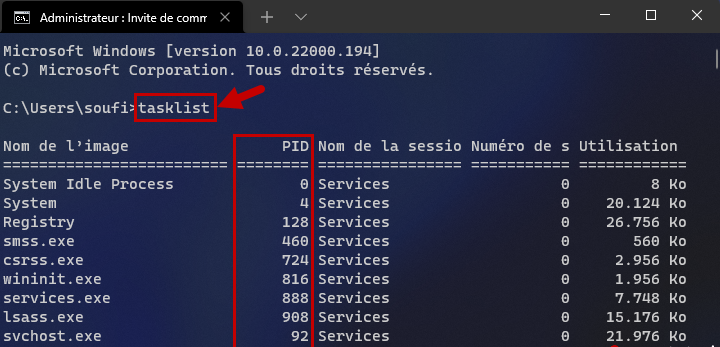
target_parent_pid = 4532  # PID of explorer.exe obtained from tasklist

parent_handle = ctypes.windll.kernel32.OpenProcess(
    PROCESS_ALL_ACCESS,
    False,
    target_parent_pid
)

# PROC_THREAD_ATTRIBUTE_PARENT_PROCESS is then passed to
# InitializeProcThreadAttributeList and UpdateProcThreadAttribute
# before calling CreateProcess — resulting in a child whose PPID
# appears as explorer.exe in all standard telemetry including
# Task Manager, Event 4688, and Process Explorer PPID column.

print(f"Parent handle acquired: {parent_handle}")
print("Child created under spoofed parent will appear as explorer.exe child.")
This is exactly why lsass exe and explorer exe are consistently targeted as spoofed parents: they are permanent fixtures in every Windows process tree, they are expected to have children in specific contexts, and their presence triggers no baseline alerting without deliberate detection logic applied.
Process Hollowing and In-Memory Image Replacement
A separate and equally well-documented evasion technique is process hollowing, formally T1055.012.
In this model, malware creates a legitimate Windows process — commonly notepad.exe, rundll32.exe, or svchost.exe — in a suspended state. It then unmaps the original executable image from the process memory space, writes its own payload into the vacated virtual address range, and resumes execution.
The visible process in Process Explorer will show a legitimate binary name, a signed on-disk image, and an expected parent. The memory space, however, is executing a completely different payload with no relationship to the displayed image path.
Detecting this requires memory forensics, not just live process tree inspection.
Key indicators visible in Process Explorer that suggest hollowing:
- The Verified Signer column shows a legitimate signed binary, but VirusTotal analysis of the loaded memory sections returns anomalous results
- Memory regions marked as
MEM_PRIVATEwithPAGE_EXECUTE_READWRITEprotection in the process memory map — a protection combination that legitimate Windows binaries rarely require post-initialization - Discrepancy between the displayed image path in Process Explorer and the actual modules loaded in the lower DLL pane
Forensic Artifact Analysis with Process Explorer and Structured Telemetry
No single tool provides a complete forensic picture of orphaned child process activity.
Accurate root cause classification requires cross-referencing at minimum three independent telemetry layers, each covering a different limitation of the others.
Reading Process Trees Effectively in Process Explorer
Process Explorer, the Sysinternals utility maintained by Microsoft, remains the most accessible and most information-dense real-time forensic interface for Windows process analysis available at zero cost.
Unlike Windows Task Manager, Process Explorer displays the full parent-child process tree with image path verification, digital signature status, loaded DLL modules, open handles, memory sections, and VirusTotal integration — all simultaneously in a single interface.
Critical columns to enable for IR triage work:
- PPID — compare the claimed parent PID against expected behavior for that process type
- Verified Signer — immediately surface unsigned or invalid-signature binaries
- Image Path — identify processes executing from
%TEMP%,AppData\Roaming,C:\Users\Public\, or any non-standard directory - Company Name — rapid triage for unsigned or unfamiliar third-party executables
- DEP / ASLR Status — processes with disabled exploit mitigations warrant immediate attention
When a child process appears in the tree under explorer exe but its image path resolves to C:\Windows\Temp\svc_update.exe or a user-writable directory, that is a high-confidence indicator regardless of what the parent claim shows.
Microsoft Process Monitor extends this real-time view to the system call level — capturing file operations, registry reads, and network connections correlated per-process from the moment of creation. Together, these two tools cover real-time forensic triage with no licensing cost.
Event IDs, ETW Providers, and Sysmon Telemetry
Reconstructing orphaned process lineage accurately requires deliberate cross-referencing across the following telemetry layers:
Windows Security Event ID 4688 — Process Creation
Captures PID, parent PID (PPID), process image path, command line (if audit policy is enabled), and token information. Critical limitation: it uses raw PIDs which recycle, and it does not use GUIDs. On high-activity systems, PID recycling can make a legitimate parent appear orphaned in retrospect.
Sysmon Event ID 1 — ProcessCreate
Records the process GUID, parent GUID, SHA256 hash of the image, full command line, and user context. The GUID-based tracking eliminates PID recycling ambiguity entirely. This is the forensic gold standard for lineage reconstruction and should be the primary pivot field when investigating clustered orphan events.
ETW Providers — RPC and WMI Activity
For brokered execution paths, enabling Microsoft-Windows-RPC and Microsoft-Windows-WMI-Activity ETW providers exposes the originating call stack before the child process is even visible in standard process logging. This is the only reliable telemetry layer that reveals the true orchestration source when Windows service hosts are the visible broker parent.
A KQL detection query for suspicious child process creation under explorer exe, deployable in Microsoft Sentinel:
DeviceProcessEvents
| where InitiatingProcessFileName =~ "explorer.exe"
| where FileName in~ (
    "powershell.exe", "cmd.exe", "wscript.exe",
    "cscript.exe", "mshta.exe", "regsvr32.exe",
    "certutil.exe", "bitsadmin.exe"
  )
| where InitiatingProcessCommandLine !contains "shell:AppsFolder"
| where InitiatingProcessCommandLine !contains "open"
| project
    Timestamp, DeviceName, FileName,
    ProcessCommandLine, InitiatingProcessFileName,
    InitiatingProcessCommandLine, AccountName
| order by Timestamp desc
This detects script interpreters and living-off-the-land binaries (LOLBins) spawned under explorer exe without standard interactive shell invocation patterns — a reliable early signal for PPID-spoofed or injected execution that would otherwise look plausible in a basic process tree view.
A Sigma rule targeting lsass exe child process creation — a near-universal indicator of credential access staging or injection:
title: Suspicious Child Process of lsass.exe
id: b5de0c9d-4a3f-4f1c-9c1b-1f8e3da08ac6
status: experimental
description: >
  Detects any process spawned directly by lsass.exe.
  Outside of WerFault.exe crash handling, lsass.exe
  should never produce child processes in normal operation.
author: SolideInfo Research
logsource:
  category: process_creation
  product: windows
detection:
  selection:
    ParentImage|endswith: '\lsass.exe'
  filter_werfault:
    Image|endswith:
      - '\WerFault.exe'
      - '\werfaultsecure.exe'
  condition: selection and not filter_werfault
falsepositives:
  - Windows Error Reporting following an lsass crash event
level: high
tags:
  - attack.credential_access
  - attack.t1003.001
  - attack.defense_evasion
  - attack.t1134.004
lsass.exe — the Local Security Authority process responsible for Windows authentication, credential storage, and Kerberos ticket processing — should produce child processes only in crash-reporting scenarios. A child process under lsass exe that is not WerFault.exe is a confirmed anomaly and should trigger immediate escalation regardless of context.
Brokered Execution Through Windows Subsystems
A technically significant category of “orphaned” child processes that is frequently misattributed to attacks is brokered execution.
These are processes launched through legitimate Windows intermediary components rather than directly by a user session, script, or interactive parent. Common broker parents and their associated launch mechanisms:
- WMI execution → visible parent:
wmiprvse.exe(Port 135 / RPC) - Scheduled task launch → parent:
taskeng.exeorsvchost.exe -k netsvcs - COM surrogate → parent:
dllhost.exe - Service control manager → parent:
services.exe - PowerShell Remoting / WinRM → parent:
wsmprovhost.exe - PsExec-style remote service → parent:
services.exewriting toAdmin$
All of these are legitimate Windows execution paths. The analytical question is never whether the parent is a broker — it is whether the child command line, image path, execution timing, and user account are consistent with expected activity for that specific broker type.
A burst of unusual children under wmiprvse.exe at 02:30 AM from a workstation with no active WMI management policy is a completely different risk profile than the same pattern during a scheduled backup window.

IR Workflow from Detection to Containment
When a burst cluster of orphaned child processes is confirmed through Process Explorer or corroborated by Sysmon telemetry, the IR workflow must begin with structured root cause classification before any containment action is taken.
Premature containment — particularly rebooting the endpoint — destroys volatile forensic evidence including running memory, active handles, and in-flight network connections that are critical for accurate attribution.
Triage Classification and Root Cause Identification
Three structured questions frame the triage decision:
1. Is the PPID gap explained by PID recycling and telemetry timing?
Compare the Sysmon parent GUID (Event ID 1) against the PID chain in Event 4688. If the GUID lineage is intact but the PID appears orphaned in 4688 records, this is PID recycling causing a telemetry artifact — not an attack indicator. The GUID chain is the authoritative source.
2. Is lineage manipulation present?
If the Sysmon parent GUID does not match the process that claims to be the parent in the PPID field, PPID spoofing is confirmed. Document the actual parent process, the spoofed parent identity, the child image hash, and the creation timestamp before proceeding to containment.
3. Is the in-memory image consistent with the on-disk binary?
Use Process Explorer‘s VirusTotal integration on the suspicious process to compare the on-disk image hash. For definitive hollowing confirmation, acquire a memory dump and analyze it offline with Volatility using the malfind plugin — which surfaces VAD entries with executable private memory inconsistent with the loaded module list.
A Python triage script using psutil to capture a live process tree snapshot with creation timestamps — useful for establishing a pre-containment baseline before any changes are made to the endpoint:
import psutil
import json
from datetime import datetime

def capture_process_tree():
    """
    Captures a live snapshot of all running processes with parent,
    executable path, owner, and creation time for forensic baseline.
    """
    process_map = {}
    for proc in psutil.process_iter(['pid', 'ppid', 'name', 'exe', 'username', 'create_time']):
        try:
            info = proc.info
            process_map[info['pid']] = {
                'name':    info['name'],
                'ppid':    info['ppid'],
                'exe':     info['exe'],
                'user':    info['username'],
                'created': datetime.fromtimestamp(info['create_time']).isoformat()
            }
        except (psutil.NoSuchProcess, psutil.AccessDenied):
            continue
    return process_map

snapshot = capture_process_tree()
output_path = "process_snapshot_{}.json".format(
    datetime.now().strftime("%Y%m%d_%H%M%S")
)
with open(output_path, 'w') as f:
    json.dump(snapshot, f, indent=2)

print(f"Process tree snapshot written to {output_path}")
print(f"Total processes captured: {len(snapshot)}")
This script preserves the process state at the moment of triage. Run it before any remediation action so that PID recycling and endpoint reboot cycles do not destroy the lineage clues that still exist in the live system.
Corporate Endpoint Mitigation and Logging Architecture
For enterprise environments, the most effective mitigation tier is built on visibility depth and structured containment — not reactive blocking rules that attackers can test against in advance.
The foundational control is Sysmon deployment with full process creation logging, including parent GUID tracking, SHA256 hashing, and command line capture. The Sysmon configuration should also enable ProcessTampering events (Event ID 25), which explicitly flag process image replacement at the Windows kernel level — directly covering the process hollowing scenario without requiring memory forensics.
Beyond Sysmon, the following event sources should be correlated against the same timestamp window as the orphaned process cluster:
- Scheduled task creation: Event IDs 4698, 4700, 4702 (Security log)
- Service installation: Event ID 7045 (System log) — critical for PsExec-style lateral movement
- WMI persistence: Event IDs 5857, 5858, 5861 (Microsoft-Windows-WMI-Activity)
- Remote logon and VPN authentication: Event ID 4624, specifically Logon Type 3 (network) and Type 10 (remote interactive)
- SMB administrative share access: Event ID 5140 — particularly for
Admin$andC$share access preceding service creation
Restricting local administrator rights on workstations removes the most commonly exploited privilege level needed to install temporary services, write to administrative shares, or load unsigned kernel-adjacent code.
Preserving volatile telemetry before any reboot is not optional — it is forensically mandatory. PID reuse, handle closure, and memory clearing during shutdown will permanently eliminate the parent-child residue that only exists in the running system state.

Consumer and SMB Endpoint Hardening
For non-enterprise endpoints — home users, small businesses, or unmanaged personal devices — the mitigation framework is fundamentally different.
Enterprise-grade telemetry tooling is neither available nor necessary at this tier. The priority is closing access paths before any network-side activity can transition into endpoint-side process creation:
- Keep Windows Defender, Windows Firewall, and automatic updates enabled at all times — these three controls alone block the majority of commodity attack vectors
- Disable Remote Desktop if not actively used — eliminating the RDP broker path removes the most common entry point for network-authenticated brokered child process creation
- Secure the home or office router with updated firmware and WPA2 or WPA3 Wi-Fi encryption — a compromised router can facilitate session hijacking before the endpoint is even involved
- Review and uninstall unused remote support or VPN client software that may maintain persistent inbound listening paths without the user’s awareness
- Periodically audit startup applications and Windows Task Scheduler entries for unfamiliar or recently added tasks
The goal at this level is not to replicate enterprise SOC monitoring. It is to ensure that the most common network-authenticated access paths — RDP brute force, SMB relay, WMI remote execution — never reach the endpoint’s process execution layer in the first place.
Consumer-level defenders benefit most from closing entry points. Corporate defenders benefit most from deeply instrumenting the interior so that when entry occurs, the full execution chain is reconstructable.
Enterprise vs Open Source Tooling for Windows Process Forensics
Choosing between commercial and open source tooling for Windows process forensic capability is rarely a binary decision. Most mature SOC environments operate a deliberate hybrid stack where each tool tier covers a specific gap in the others.
Tool Tier Comparison
| Tool | Category | Forensic Strength | Primary Limitation |
|---|---|---|---|
| Process Explorer | Free / Microsoft | Real-time process tree, VT integration, memory map | No historical logging — live view only |
| Microsoft Process Monitor | Free / Microsoft | Syscall-level file, registry, network correlation | High event volume — requires deliberate filtering |
| Sysmon | Free / Microsoft | Persistent GUID-based lineage, hash, command line | Requires well-tuned configuration to avoid noise |
| Volatility | Open Source | Memory forensics, hollowing detection via VAD analysis | Requires memory dump acquisition — offline analysis |
| Velociraptor | Open Source | Enterprise-scale artifact hunting, live response at scale | Steep deployment and configuration learning curve |
| CrowdStrike Falcon | Commercial EDR | Kernel-level telemetry, managed threat intelligence | Licensing cost, vendor lock-in |
| SentinelOne | Commercial EDR | AI behavioral detection, automated rollback | Resource overhead on endpoints, cost |
| Microsoft Defender XDR | Commercial / Included | Native Windows telemetry, Sentinel integration | Detection depth varies by license tier |
For detecting process hollowing specifically, Volatility with the malfind and vadinfo plugins remains the most capable open source option precisely because it operates directly on raw memory pages.
It exposes discrepancies between the on-disk executable image and the actual in-memory execution sections — discrepancies that real-time tools including Process Explorer cannot surface without explicit memory map inspection and hash comparison.
For PPID spoofing detection at scale, Sysmon with a well-tuned ruleset feeding into a SIEM with the KQL queries demonstrated earlier provides a practical enterprise coverage tier without requiring a commercial EDR license.
The commercial EDR advantage is concentrated in three areas that open source tooling genuinely struggles to match: kernel-level telemetry depth, automated threat response with rollback capability, and integrated threat intelligence correlation at machine speed. Not in fundamental detection logic that a skilled analyst cannot replicate with deliberate open source configuration.

Deep-Tech FAQ
Q: How does Process Explorer detect a hollowed process without a memory dump?
Process Explorer surfaces partial hollowing indicators through two mechanisms. First, the VirusTotal integration scans the on-disk image hash — if the hash matches a clean binary but the process is exhibiting anomalous behavior, that inconsistency is itself an indicator. Second, the process memory map view in Process Explorer can reveal MEM_PRIVATE regions with PAGE_EXECUTE_READWRITE protection that should not exist in a legitimately loaded system binary. However, definitive hollowing confirmation requires Volatility’s malfind plugin operating against a raw memory image — which compares VAD (Virtual Address Descriptor) entries against the expected loaded module list and flags executable private memory regions inconsistent with legitimate module mapping.
Q: Can lsass.exe legitimately spawn child processes on a patched Windows 11 system?
Under normal Windows operation, lsass exe — the Local Security Authority process managing authentication, NTLM, Kerberos, and the Windows credential store — should produce child processes exclusively in the form of WerFault.exe following an lsass.exe crash event. Any other child process under lsass exe on a healthy system represents a high-confidence anomaly. Common attacker objectives when targeting this parent include credential dumping via T1003.001, injection for privilege escalation, or using lsass exe as a spoofed trusted parent for a second-stage payload launcher. The Sigma rule in this article will detect this pattern reliably across any Sysmon-instrumented endpoint.
Q: What is the technical difference between PPID spoofing and process hollowing from a detection standpoint?
PPID spoofing produces a process with incorrect parentage but legitimate memory content — it is detectable through telemetry cross-referencing, specifically the mismatch between the PPID in Windows Event 4688 and the parent GUID in Sysmon Event ID 1.
Process hollowing produces a process with correct parentage but incorrect memory content — it is not detectable through lineage analysis alone and requires memory inspection.
Both are frequently used together in multi-stage campaigns: hollowing hides the payload, and PPID spoofing hides the launch chain. PPID spoofing is a logging artifact anomaly. Process hollowing is a memory anomaly. They require different detection layers applied simultaneously.
Q: Does VPN usage directly affect child process parent attribution on the endpoint?
The VPN itself is a transport layer and does not directly create processes on the endpoint. However, sessions established through a VPN — particularly RDP (Port 3389), WMI (Port 135), and SMB-based remote management (Port 445) — produce child processes whose visible parent is a Windows service broker (svchost.exe, wmiprvse.exe, taskeng.exe, wsmprovhost.exe) rather than an interactive user desktop session.
This creates the appearance of detached or orphaned children when the actual origination was a remote-authenticated session traversing the VPN tunnel. The VPN access log and the endpoint process creation log must be correlated on account identity and session timestamp to reconstruct the full path. Neither layer alone tells the complete story.
Q: What telemetry configurations are most likely to produce false orphaned process alerts?
The most common false-positive scenario involves short-lived launcher processes — PowerShell one-liners, software installer wrappers, or scheduled task launchers — that spawn children and exit before the logging layer captures the complete event chain. When this occurs during high-load burst windows, the child PPID may reference an already-recycled PID in Event 4688, creating the appearance of orphanhood in SIEM dashboards.
Sysmon’s GUID-based lineage tracking eliminates the majority of these false positives because the parent GUID is assigned at creation time and persists independently of PID recycling. Enabling Sysmon on all endpoints and pivoting on GUID chains rather than raw PIDs is the single configuration change that most dramatically reduces process lineage false-positive volume in enterprise SIEM deployments.
Q: How should L2/L3 analysts correlate VPN authentication logs with endpoint process creation events during investigation?
The correlation pivot is account identity combined with logon session ID (LSAID). Extract VPN authentication events alongside Windows Event ID 4624 (Logon Type 3 for network, Type 10 for remote interactive). Capture the Logon Session ID from the 4624 event. Then search subsequent process creation events (Sysmon EID 1 or Event 4688) filtered to that same LSAID within the relevant time window.
When a VPN logon from an unusual source IP is immediately followed by brokered child processes under wmiprvse.exe or services.exe during off-hours — especially under an account with no history of WMI or remote management activity — that combination warrants immediate escalation to Tier 3 or incident declaration, not just alert queuing.
Q: Is Microsoft Process Monitor sufficient as the primary forensic tool in a post-compromise investigation?
Microsoft Process Monitor is highly effective for live analysis when the compromise is suspected to be currently active — it captures syscall-level file, registry, and network activity correlated per process in real time. However, it does not retain historical data across system reboots or across sessions when it was not running.
For post-compromise reconstruction where the attacker activity occurred before the investigation began, the forensic base must be built from Sysmon event logs, Windows Security and System event logs, ETW trace data, and memory forensics using Volatility. Process Explorer and Microsoft Process Monitor serve as critical live triage supplements — not primary forensic evidence sources in a structured post-incident timeline reconstruction.
Closing Assessment
Understanding why Process Explorer and structured telemetry reveal orphaned child processes requires accepting that Windows process lineage is not guaranteed by the operating system — it must be actively preserved through deliberate instrumentation.
The technical patterns covered in this article — PID recycling telemetry gaps, PPID spoofing via PROC_THREAD_ATTRIBUTE_PARENT_PROCESS, process hollowing through suspended-state injection, brokered execution through Windows service subsystems, and remote access sessions over VPN that transition into host-side process creation — represent the core evasion landscape that L2 and L3 analysts encounter when investigating unexplained child process clusters in enterprise environments.
Corporate defenders achieve the best outcomes through Sysmon GUID-based lineage logging, cross-correlated with VPN authentication, remote execution traces, service creation events, and WMI activity — with memory forensics available as the confirmation layer when hollowing is suspected. Consumer-level defenders achieve the best outcomes by ensuring that the network-side access event never reaches the endpoint execution layer at all.
Whether the tool of choice is Process Explorer, Microsoft Process Monitor, Volatility, or a commercial EDR platform, the analytical framework remains constant: trace the lineage, verify the memory, correlate the telemetry, and classify before containing.
Process forensics is not a product — it is a discipline built on understanding how process explorer data, event log chains, and memory analysis work together to reconstruct what Windows itself can no longer tell you after the parent has exited.
Discover more from Solide Info | The Engineer’s Authority on Cyber Defense
Subscribe to get the latest posts sent to your email.