For IT professionals, system administrators, and remote power users, commodity internet is no longer sufficient. Verizon Fios packages represent the gold standard in residential and small business connectivity by utilizing a 100% Fiber-to-the-Home (FTTH) architecture. Unlike hybrid-coaxial networks used by cable providers, Fios delivers symmetrical bandwidth, sub-millisecond latency within the provider network, and enterprise-grade reliability.
Selecting the right verizon fios internet tier or bundle is not just about entertainment; it is an infrastructure decision for your home office or homelab. This guide strips away marketing rhetoric to analyze the technical specifications, equipment capabilities, and ROI of fios bundles.
Key Takeaways:
- Architecture Matters: Fios uses GPON (Gigabit Passive Optical Network) or NG-PON2 technology, delivering dedicated bandwidth that is not shared with neighbors like cable DOCSIS loops.
- Symmetry is Key: Verizon Fios packages offer symmetrical upload/download speeds, a critical requirement for VPNs, offsite backups, and hosting services.
- BYOD Friendly: While Verizon offers capable hardware, the architecture supports easy integration with prosumer gear (Ubiquiti, pfSense) via direct Ethernet handoff from the ONT.
- Bundling Economics: Leveraging verizon tv and internet bundles alongside Verizon Wireless plans can lower total cost of ownership (TCO) by up to $25/month.
Deep Dive into Verizon Fios Packages
To evaluate verizon fios packages, one must understand the underlying physical layer. Most ISPs market “fiber-powered” networks, which are often Fiber-to-the-Node (FTTN), relying on aging copper coaxial cable for the “last mile” into your home. This introduces electrical interference, higher latency, and upload speed bottlenecks.
Verizon Fios utilizes FTTH (Fiber-to-the-Home).
Technically, this operates on a Passive Optical Network (PON). Light signals travel from the Optical Line Terminal (OLT) at the Central Office directly to the Optical Network Terminal (ONT) installed at your premise.
How It Works Technically:
- Downstream: Data is broadcasted via optical splitters (usually 1:32 ratio), but encryption ensures your ONT only processes your data.
- Upstream: Time Division Multiple Access (TDMA) is used to manage upstream traffic, preventing collisions and ensuring consistent upload throughput.
- The 2 Gig Upgrade: For the newest multi-gig fios bundles, Verizon is rolling out NG-PON2. This utilizes tunable lasers to stack multiple wavelengths on the same fiber strand, allowing for massive throughput increases without re-cabling the street.
Real-World Scenario: The Remote DevOps Engineer
Consider a Senior DevOps Engineer managing a Kubernetes cluster. They need to push a 5GB Docker container image to a registry.
- On Cable (DOCSIS 3.1): With 1000 Mbps down but only 35 Mbps up, this upload takes nearly 20 minutes. The connection saturates, causing “bufferbloat” that kills Zoom call quality during the upload.
- On Fios (1 Gig Symmetrical): With 940 Mbps up, the same upload takes 45 seconds. The low latency ensures their SSH sessions to the cloud remain responsive simultaneously. This is the operational difference of verizon fios internet.
Core Features & Technical Capabilities
When assessing verizon fios packages, look beyond the advertised “speed.” The value for an IT administrator lies in the protocol-level performance and equipment flexibility.
1. Symmetrical Bandwidth
Most verizon tv and internet bundles include symmetrical speeds (e.g., 300/300, 500/500, 940/880).
- IT Benefit: Essential for VPN overhead, NAS-to-NAS offsite backups (e.g., sending data to Backblaze or S3), and hosting local game servers or Plex media servers.
2. Low Latency and Jitter
Because the signal travels as light until it hits your wall, Fios typically exhibits ping times of 2-8ms to local exchange points.
- IT Benefit: Crucial for VDI (Virtual Desktop Infrastructure) sessions, VoIP clarity, and real-time financial trading.
3. The “Mix & Match” Platform
Verizon has abandoned the “Triple Play” contracts of the 2010s. The current “Mix & Match” 4.0 platform allows granular selection of internet speed and TV tiers without locking you into 2-year agreements.
- IT Benefit: Flexibility. You can scale bandwidth up for a specific project month and scale down later without penalty.
4. Advanced Hardware: The CR1000A
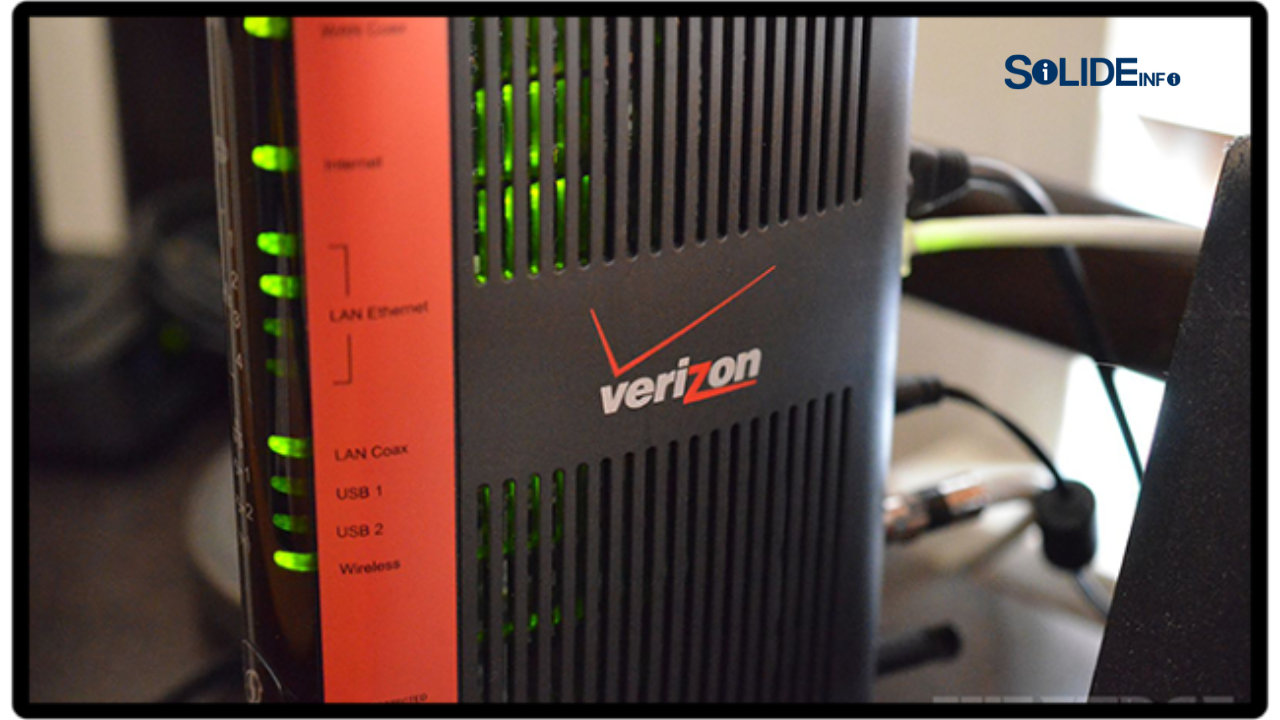
Newer fios bundles often include the Verizon Router (Model CR1000A or CR1000B).
- Specs: Wi-Fi 6E (6GHz band), 10GbE WAN port, 2.5GbE LAN ports.
- IT Benefit: The 6GHz band reduces congestion in dense apartment complexes. The 10GbE WAN port ensures the router is not the bottleneck for multi-gig services.
Verizon Fios vs. Market Alternatives
To demonstrate why verizon fios packages often rank highest for technical users, we compare the physical layer constraints against cable and 5G alternatives.
Comparison Table: Throughput & Architecture
| Feature | Verizon Fios (Fiber) | Cable (Xfinity/Spectrum) | 5G Home Internet |
| Architecture | FTTH (GPON/NG-PON2) | HFC (DOCSIS 3.1) | Wireless (C-Band/mmWave) |
| Max Download | 2.3 Gbps (Select Areas) | 1.2 – 2 Gbps | 300 – 1000 Mbps |
| Max Upload | 2.3 Gbps (Symmetrical) | 35 – 200 Mbps (Asym) | 10 – 50 Mbps |
| Typical Latency | 2 – 8 ms | 15 – 40 ms | 30 – 70 ms |
| Data Caps | None | Often 1.2TB (regional) | None (usually) |
| Throttling | Minimal | Congestion-based | Deprioritized vs Mobile |
| Contract | Month-to-Month | Often 1-2 Years | Month-to-Month |
The Verdict on Alternatives
- Vs. Cable: Cable is acceptable for consumption (streaming Netflix). It is inferior for production (uploading data, hosting services).
- Vs. 5G: 5G is a fallback solution. High jitter makes it unsuitable for consistent VPN tunnels or RDP sessions required by IT professionals.
Implementation Guide: Optimizing Your Fios Setup
Simply signing up for verizon fios internet is not enough. You must configure the topology correctly to avoid double-NAT and maximize throughput.
Step 1: The ONT Handoff
The Optical Network Terminal (ONT) converts the optical signal to copper Ethernet.
- Best Practice: Ensure the technician runs Cat6 or Cat6a Ethernet from the ONT WAN port to your router location.
- Legacy Mistake: Do not let them use the Coax port on the ONT for internet (MoCA WAN) unless absolutely necessary. It limits speed and complicates using your own router.
Step 2: Router Strategy (BYOD vs. Rental)
Verizon Fios packages generally include router rental in the price (or waive the fee).
- The Rental Route: The CR1000A is solid for 95% of users. It supports MoCA 2.5, which is required if you get verizon tv and internet packages (the TV boxes get internet over Coax).
- The Prosumer Route (Ubiquiti/Mikrotik/pfSense):
- Connect your router’s WAN port directly to the ONT Ethernet port.
- The ONT will issue a public WAN IP via DHCP.
- Note: If you also have Fios TV, you will lose Guide Data and VOD unless you install a MoCA adapter to bridge the internet from your LAN onto the Coax network for the Set-Top Boxes.
Step 3: Wi-Fi Optimization
If utilizing the Verizon router:
- Disable “SON” (Self-Organizing Network) if you prefer separate SSIDs for 2.4GHz (IoT devices) and 5GHz/6GHz (Laptops/Phones).
- Use the “Verizon Fios Home” app to map signal strength (RSSI) in dead zones.
Common Configuration Mistakes
- Using Cat5e for 2 Gig: While Cat5e can do 2.5Gbps over short runs, it is not certified for it. Use Cat6a for 2 Gig plans.
- Double NAT: Connecting a Mesh system (e.g., Eero) behind the Verizon Router without putting the Verizon Router in Bridge Mode. This breaks VPNs and port forwarding.
- Battery Backup Neglect: The ONT requires power. If you do not put the ONT on a UPS (Uninterruptible Power Supply), your internet goes down during a blackout, even if your laptop is charged.
Fios TV Packages: The Data-Driven Choice
While cord-cutting is prevalent, verizon tv and internet bundles remain popular due to latency-free live sports and unified billing.
The “Test Drive” Approach
For the analytical user, the Fios TV Test Drive is the smartest option.
- Phase 1: You get access to all 425+ channels for 60 days.
- Phase 2: Verizon analyzes your viewership telemetry.
- Phase 3: They recommend a specific tier (Your Fios, More Fios, or Most Fios) that covers what you actually watch, saving you money.
TV Bandwidth Usage
IT Pros should note: Fios TV uses a separate wavelength (QAM) for linear TV on the fiber. Watching 4K TV does not consume your internet bandwidth capability. This is a distinct advantage over streaming services (YouTube TV/Hulu Live) which eat into your data throughput.
Pricing & ROI Analysis
When evaluating fios bundles, look at the Cost Per Mbps and TCO (Total Cost of Ownership).
Cost Structures (2024/2025 Estimates)
- 300 Mbps: ~$49.99/mo.
- ROI: Best for single users or couples. Sufficient for 4K streaming and standard WFH.
- 500 Mbps: ~$69.99/mo.
- ROI: The Sweet Spot. High enough bandwidth for heavy multitasking without the premium price of Gig.
- 1 Gig: ~$89.99/mo.
- ROI: Diminishing returns for average users. Necessary if you transfer large files daily. Includes router and streaming perks.
- 2 Gig: ~$119.99/mo.
- ROI: Only viable if you have 2.5GbE+ LAN infrastructure. If your PC has a 1Gbps NIC, you are wasting money.
Stacking Discounts
You can significantly lower the TCO of verizon fios packages through:
- Mobile + Home: If you have a Verizon 5G Unlimited mobile plan, you get $10 – $25 off your Fios bill.
- AutoPay: Usually a $10/month discount.
- Employer Discounts: Check Verizon Connections for corporate discounts.
Frequently Asked Questions (FAQs)
Q: Does Verizon Fios Internet provide a Static IP?
A: Residential verizon fios packages use Dynamic IPs. However, the lease times are very long; you might keep the same IP for months. For a true Static IP, you must switch to Fios Business, which costs significantly more. Most IT pros use Dynamic DNS (DDNS) or Cloudflare Tunnels to bypass this on residential lines.
Q: Can I keep my Fios email address if I switch ISPs?
A: Verizon has largely retired its email service (verizon.net) and migrated users to AOL/Yahoo. It is highly recommended to use a provider-agnostic email (Gmail, Outlook, ProtonMail) to avoid vendor lock-in.
Q: Is the 2 Gig plan compatible with my current wiring?
A: Likely not. You need a specific ONT (Nokia/Calix specific to NG-PON2) and the CR1000 router. Furthermore, your in-wall Ethernet must be Cat6 or better, and your switches/NICs must support 2.5GbE or 10GbE.
Q: What is the upload speed on the Gigabit connection?
A: On the 1 Gig plan, speeds are typically advertised as up to 940 Mbps download and 880 Mbps upload due to overhead. It is virtually symmetrical.
Q: Do Fios bundles include Netflix/Disney+?
A: Frequently, yes. Verizon cycles promotions aggressively. High-tier verizon tv and internet packages often include 6-12 months of the Disney Bundle or Netflix, increasing the effective value of the package.
Conclusion
For the IT professional or discerning homeowner, Verizon Fios packages offer a superior infrastructure compared to coaxial cable or wireless alternatives. The low latency, symmetrical bandwidth, and lack of data caps make it the ideal foundation for a modern, high-demand smart home or home office.
While the marketing pushes speed, the real value lies in the fiber-optic architecture. By selecting the 500 Mbps or 1 Gig tier and utilizing the “Mix & Match” flexibility to avoid bloatware TV channels, you can secure enterprise-grade connectivity at consumer prices.
Next Step:
Audit your current network. Run a speed test on a hardwired connection. If your upload speed is less than 50 Mbps and you work from home, you are operating with a bottleneck.
Check your address for Fios availability and verify if your mobile plan qualifies you for the Mobile + Home discount to maximize your ROI.
Discover more from Solide Info | The Engineer’s Authority on Cyber Defense
Subscribe to get the latest posts sent to your email.